With the new shelf page is there any way to filter a list to not include a platform in the list? I am trying to exclude PC games to find just console exclusives in my wish list.
1 Like
I got the platform bug this morning. I know why I missed it. I had it working properly for ranked shelves, but not for unranked shelves.
Let me know if you see anything else weird.
I tried to add in a No Platform Specified filter too. It’s mostly working, but it works really really slow on larger lists, and I can’t figure out why yet. I believe @Jeslie was looking for that.
3 Likes
I was indeed–thank you sir! That’ll help me get things updated. Or as my cat filled in for me, get things yu777778yhgggggggg.
I think she says thank you too, since that means more lap time for her. 
1 Like
I made it way faster today too.
Let me know if it seems wrong at all. I’m known to screw some stuff up here and there 
Also, thank you for the idea! This is causing me to go back and specify the platforms on my collection, and it’s helping me figure out where the hell I got a bunch of my collection. I have so many games from Epic/PS+ that I never punched in the platform for, and this is causing me to finally go figure it out.
1 Like
It’s on the list to add a Not platforms filter. At some point I’m going to have to delineate advanced filters vs “normal” filters, whatever that means. I just don’t want to end up with 102 filters for people who just want to search or sort by dates or whatever. I’ll figure it out though.
1 Like
I believe I found a bug that causes a http 500 response when combining No platform specified with any other platform in the Your platforms filter. By itself, the no platform specified option works fine.
Yeah, I got the emails. I just pushed an update. I think it works now. Thanks!
1 Like
Of course while I was testing that, I was sitting there thinking, how would I sort by specified platform?
Is sorting for platforms relevant? Grouping maybe - but sorting? Like, I don’t think that platforms are something that can be sorted in a context-relevant manner. Would a gameboy come before or after a xbox 360? What about a snes?
I imagine most people would expect platforms to be sorted alphabetically.
1 Like
Hey, I really like the new shelf design, definately looks more modern than the old one. It could be even better if we could enable/disable certain labels on the games in list view, like this:
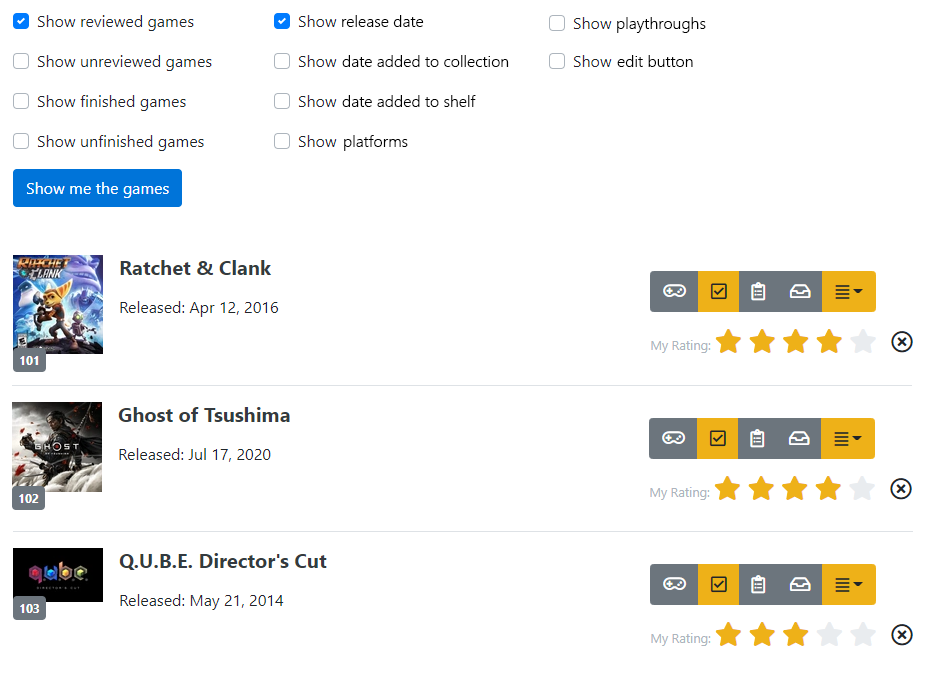
I think this can be implemented on the frontend fairly easily, and it would allow us to make the shelves tidier & more customized. For example, the date added to shelf/collection is not that useful for me, and disabling them grants some screen space to fit more games.
Also, please bring back the default sort/filter option for shelves, it was a great feature.
Thanks if you consider these suggestions, and keep up the good work.
2 Likes
Definitely going to have shelf preferences where you can remove fields. That is coming very soon. The thing I’m debating on is if this should be a universal, single shelf preference that will apply to all shelves, or if it should be a shelf by shelf basis. I can see arguments for both. I tend to like to go simple, so I’m leaning towards the universal, single preference.
I’m definitely going to put the default sort option back. It’ll be on the edit shelf page as a dropdown choice soon.
2 Likes
I like the new shelf very much, but there’s a problem. I always use the sort by “date_added”, because that’s the order I played those games. most of the games were added the day I started using grouvee, so all in the same day, but the order displayed is still the correct one, the one I used when I inserted them one by one at the start, which is also the order I played those games. now when i try to use the new shelf style, and set order by date_added in the url, all games that have been added in the same day are sorted in a different way than they used to, kind of randomly, but if I revert to the old shelf style, the old correct order comes back.
edit: I also noticed the release version doesn’t appear anymore in the new shelf.
edit2: i solved my sort issue by using for the first time the manual sorting in the shelves. now the only feature i miss from the older version is the multiple releases for a single game, they were very much appreciated.

1 Like
I’m still working on this, I promise. I’m getting to everyone’s ideas slowly. I’m redoing this page in Vue for a variety of reasons.
What do you all think of this as an idea for the Other Shelves button?
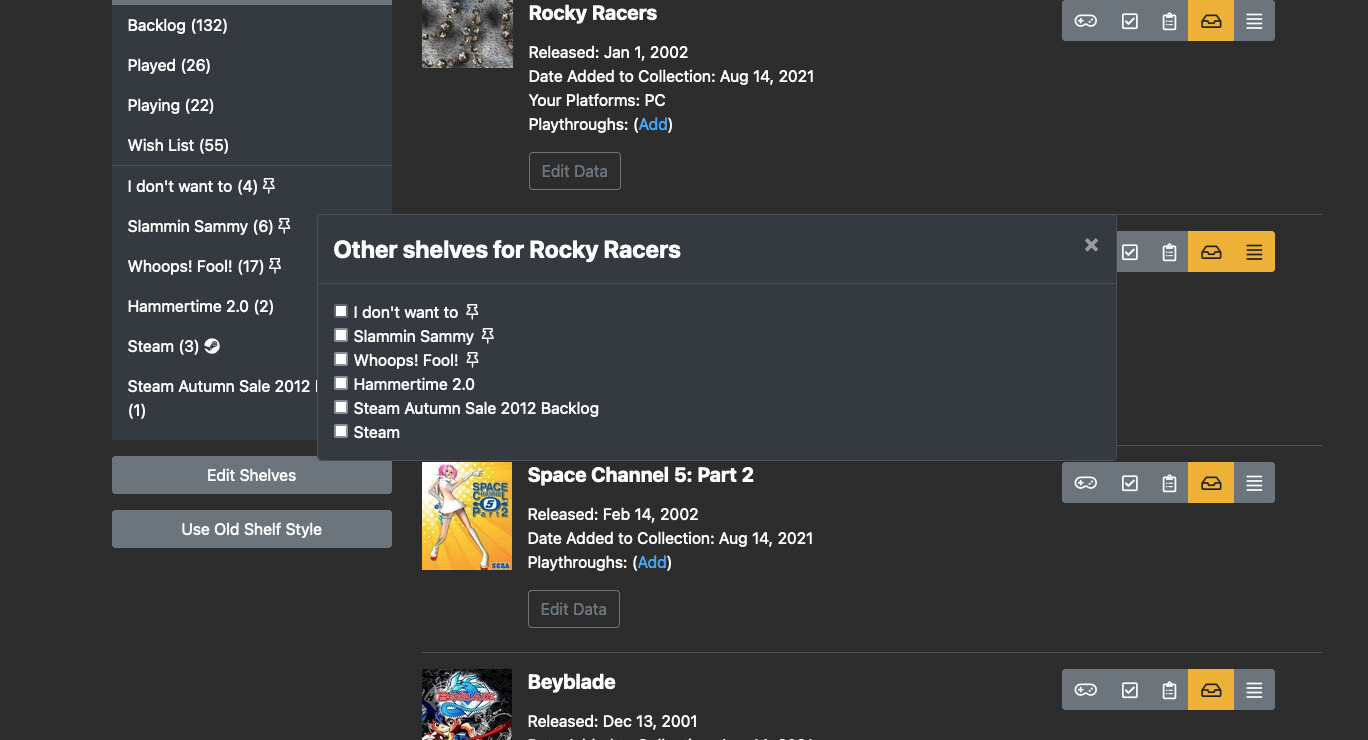
It would be a modal dialog instead of a dropdown. I personally think I like it better after using it, but I was just curious what everyone thought.
1 Like
While I’m not particularly for or against it I believe it could help making all elements behave in a coherent manner. Pretty much everything else on the page already uses popups, the other shelves button is the only thing that uses a dropdown instead.
1 Like
Hi guys,
Just stumbled across the site today and really love it. I use trakt for TV shows and movies.
Might I suggest 3 things.
-
Instead of played, have finished or completed.
-
Trakt has a API which allows me to link my lists to other services. Would be amazing to create an API which might link with a service like retroarch. I know this would take work for retro arch which you are not affiliated with, but if the API existed, we could propose they add it.
-
Consider some way of linking dlc to games, and a notifier when dlc is added. E.g. I may have completed Spider-Man, but then the dlc comes out. I get a notification that the dlc is added to the site (because I’m connected to the main game). Then when I access Spider-Man i can note if I’m playing/finished/completed the dlc too.
3 Likes
I like the change but it doesn’t support a large amount of shelves, the list gets cut off. Needs a scrollbar or something.
1 Like
You’re right! Try it now. The dialog should scroll properly now.
2 Likes
I’m new to Grouvee and loving it so far! Two big things for me so far is that I can not for the life of me find where to add new shelves in the new style. Also, I can’t figure out how to make a sort be default. Sorts constantly reset everytime I change to another shelf. I realize I can change it in the ranked section, but when you have shelves with hundreds of games, I don’t feel like that’s ideal… Am I missing something here?
2 Likes
Welcome!
I’m going to add a button on the side bar, but for now, you have to click the Hamburger button on the shelf toolbar that brings up your “other” shelves, and then you can create a shelf at the bottom of that list. I’ve had multiple ask me this, so I need to get it fixed ASAP!
I’m planning on bringing back the set default sort functionality, but I’m not sure if that’s what you’re asking. What that functionality does is sets the default sort for a specific shelf, but if you clicked to a different shelf, it would still reset the sort for that shelf you’re clicking over to. Are you wanting the sort to be “sticky” across a session. What I mean is say you sort your backlog by date added, are you wanting the next shelf you click on to also be sorted by date added?
2 Likes